The Rundown: New Transparent Templates, a Smarter GameDay, and More Control
A big batch of overlay and control upgrades just landed — led by two brand-new Transparent templates for football and basketball, a smarter Basketball GameDay, and more ways to style and control your board live. Here's the rundown.
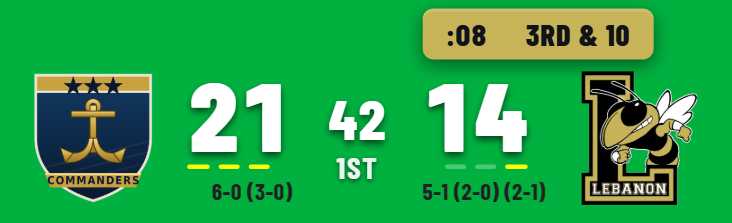
New: Transparent Templates for Football and Basketball
Two fully see-through lower thirds that let the game breathe — crisp logos, scores, records and the clock floating cleanly over your broadcast, with no bar or panel behind them.
- Football Transparent — full-height crests on the outside, scores hugging the center over their timeout dashes, and a single solid down & distance + play-clock box that rides above the team with the ball, in that team's color, mirroring to whichever side has possession.
- Basketball Transparent — the same clean look for the hardwood: full-height crests, big center-hugging scores over their timeout dashes, record plus fouls and bonus stacked beneath, and a tidy center console with the clock, period, and a shot-clock chip that flips to your warning color under pressure.
Pick either one from the designer's Template list.
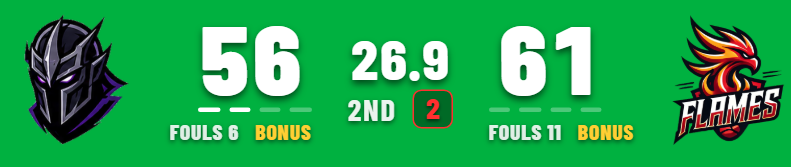
A Smarter Basketball GameDay
GameDay got a long list of upgrades:
- Timeouts that match your rules — the dots now follow your rule set (3, 4, 5, or 7 per team) instead of a fixed three.
- Three timeout looks — dots, stacked bars, or a row of dashes, and they drain toward the center so home and away mirror.
- Team-color fouls, bonus & timeouts — match each team's text color for the fouls, BONUS/BONUS+ and the timeout marks.
- Manual bonus control — a per-team Off / Bonus / Bonus+ toggle on the controller when you run bonus by hand (Calculated and Feed still update automatically).
- Title on top or bottom, a "remove backgrounds" clean mode for laying the board over your own graphics, and a clock that reads 0:45 under a minute.
Flexible Clock-Warning Styles
The low-clock (shot/play clock) warning now comes in four styles — text, filled box, outline + text, or outline + white text — and every one uses the warning color you choose.
More Control, Live
New operator tools on the controller:
- Hide on air — blank the overlay (fully transparent in OBS) with one click, without touching the score; a badge shows it's hidden, and "Show" brings it back.
- Preview up top — the live preview and Browser-Source URL sit on one row above the console, so you see the bug right where you're working.
- Refresh data — a button to reconnect the live Scorebird feed instantly, plus a behind-the-scenes watchdog that auto-recovers a stalled connection.
Optional Score Animations
Two new football celebrations you can switch on in the designer — both off by default, so nothing changes unless you want it:
- Field-goal takeover — a full-screen takeover when a field goal is good, on its own toggle (separate from the touchdown/goal takeover) so you can run one, both, or neither.
- Score roll-up — after a touchdown takeover, the score counts up to the new total instead of snapping, for a smoother reveal.
And a Few More
- Volleyball Marquee now shows each team's rank, and the label reads "SETS WON."
- Advertising — align banner ads left, center, or right, with cleaner image pickers per slot.
- Event titles sit flush against the bug by default, with a spacing control if you want a gap.
- Records — add an overall and a sub-record (conference / district) on any sport, side by side in the Teams tab.
All of this is live now — open the designer to try the new looks, and the controller for Hide and Refresh. As always, tell us what you'd like to see next.